Org Chart Maker -Organization Chart Maker1.4
Publisher Description
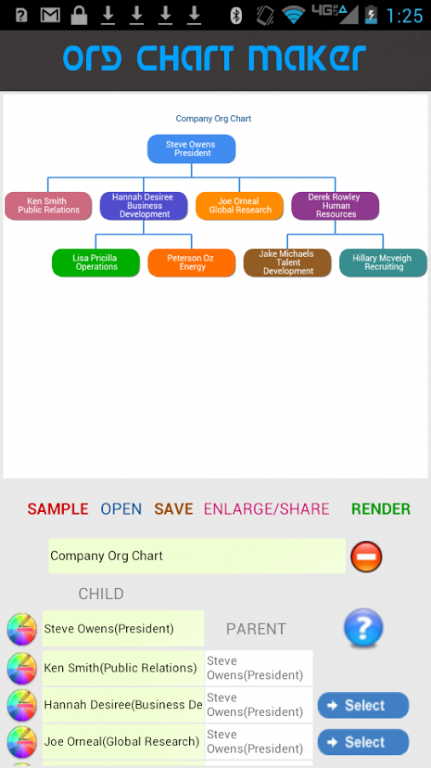
Org Chart Maker is a powerful visualization tool for creating printable Organization charts on your device. With this App you can quickly create org charts and use them instantly in your other projects.The Ability to render fullscreen charts allows you to turn your device into a powerful visualization tool. You can create a chart and copy or share it instantly by email giving you the flexibility to move it from your device.
The in-built color picker gives you the flexibility to define the look and feel of your charts. This App is ideal for Personal use, School, Business, Presentation and other areas where data visualization is key.
Org Chart Maker is very easy to use, it utilizes the Parent->Child relationships to construct an organization chart within the shortest time possible(No Drawing Hassles, Org Chart Maker Automatically draws it for you). Simply enter an item and select the Parent and Org Chart Maker will Complete the Join.
Features:
- Easily position the org chart nodes to match your desired structure/layout.
- Instantly share your Org charts to the recipients of your choice via email in PDF or PNG formats
- Save your charts for future use or edits
- Render full screen charts
- Easily print your charts
- Import & Export your chart data and easily migrate it to other devices
- Define the look and feel of your Chart by easily customizing the colors for each item in the Chart with the inbuilt color picker.
- Automatically expands canvas to fit long & wide charts
- NO Internet is required in this version. Charts render WITHOUT internet connection
* Most of the reviews given here are very old. This is a bland new version with all the issues mentioned fixed.
About Org Chart Maker -Organization Chart Maker
The company that develops Org Chart Maker -Organization Chart Maker is IWTech Mobile. The latest version released by its developer is 1.4.
To install Org Chart Maker -Organization Chart Maker on your Android device, just click the green Continue To App button above to start the installation process. The app is listed on our website since 2017-07-19 and was downloaded 17 times. We have already checked if the download link is safe, however for your own protection we recommend that you scan the downloaded app with your antivirus. Your antivirus may detect the Org Chart Maker -Organization Chart Maker as malware as malware if the download link to com.exercise.orgchartmaker is broken.
How to install Org Chart Maker -Organization Chart Maker on your Android device:
- Click on the Continue To App button on our website. This will redirect you to Google Play.
- Once the Org Chart Maker -Organization Chart Maker is shown in the Google Play listing of your Android device, you can start its download and installation. Tap on the Install button located below the search bar and to the right of the app icon.
- A pop-up window with the permissions required by Org Chart Maker -Organization Chart Maker will be shown. Click on Accept to continue the process.
- Org Chart Maker -Organization Chart Maker will be downloaded onto your device, displaying a progress. Once the download completes, the installation will start and you'll get a notification after the installation is finished.
Program Details
System requirements
Download information
Pricing
Version History
version 1.4
posted on 2017-07-19
- Render without Internet Connection
- Added Title Column
- Improved Export quality
- Bug fixes
